

Step 2
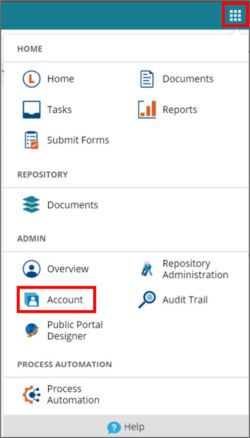
Click the navigation button (9 small squares) in the top right corner, then click Account.
Step 3
From the Account section, find the grayed-out account named CustomerAssist and select it.

Step 4
Click the greyed-out switch entitled Enable User.

Step 5
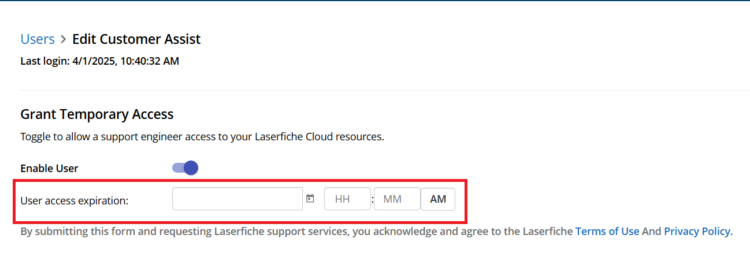
After granting temporary access, set a date when you want the CustomerAssist user to expire. We recommend setting the expiration date for 3-4 weeks out to avoid having to re-authorize access too often.
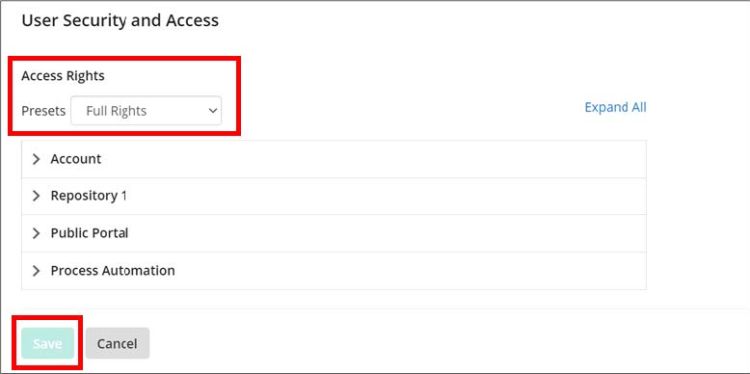
If the Presets were not already pre-filled, set the Presets under the Access Rights to Full Rights and hit Save
Step 6
Once you have completed these steps, or if you encounter any issues, please email AIS Support.